
Information
This year’s SANS Holiday Hack Challenge has a few changes. Unlike previous years where all challenges were released at once, we’re now getting them on a scheduled rollout, giving us time to dig deeper into each task. Another new feature is the introduction of bronze, silver, and gold trophies for each challenge, corresponding to different levels of difficulty.
The prologue starts us off on Frosty’s Beach.

On the island, we can find three objectives to complete.
- Holiday Hack Orientation – Talk to Jingle Ringford on Christmas Island and get your bearings at Geese Islands
- Elf Connect – Help Angel Candysalt connect the dots in a game of connections.
- Elf Minder 9000 – Assist Poinsettia McMittens with playing a game of Elf Minder 9000.
Holiday Hack Orientation
Right at our starting location, we can find Jingle Ringford standing by a terminal.

Talking to the elf, we have the following conversation.
Welcome to the Geese Islands and the 2023 SANS Holiday Hack Challenge!
I’m Jingle Ringford, one of Santa’s many elves.
…
Just kidding! It’s actually the 2024 SANS Holiday Hack Challenge!
And although we’re on Frosty’s Beach on Christmas Island, we’ll soon be on our way back to the North Pole.
I thought it best to wait here for people that heard we’re on the Geese Islands but may not know we’re leaving.
I haven’t seen Santa since we started packing up, but he always asks me to give a quick orientation to newcomers, so I’m continuing the tradition.
Before you head out any further onto the island, you need to accomplish two simple tasks.
But first, here’s a parting gift. I packed this snowball made of the magical, never-melting snow of Christmas Island. A little souvenir to take with you when we leave for the North Pole.
Click on the snowball on your avatar. That’s where you will see your Objectives, Hints, resource links, and Conversations for the Holiday Hack Challenge.
Now, click on the Cranberry Pi Terminal and follow the on-screen instructions.
Next, we click on the terminal beside Jingle Ringford. A popup window opens, revealing a terminal interface where we can begin interacting with the system.

Typing answer and pressing enter in the top pane completes the objective and we get an achievement!


Once we complete the objective, chatting with Jingle Ringford again reveals some extra dialogue.
You’re a natural! Something new this year you may not know is that all challenges have an easy and hard mode. There’s also story mode, if you want to skip the challenges and watch how our holiday season’s adventure unfolds!
Your snowball will reflect how you’ve solved the challenges with the bronze, silver, and gold trophies.
Well, that’s it, now you’re orientated! Feel free to get yourself settled in, establish a cohort with others, or just explore this lovely island. Just be careful where you walk as we are moving around some pretty heavy crates.
Oh, while we’re preparing everything to set sail for the North Pole, I heard Poinsettia McMittens and Angel Candysalt could use some assistance. I’m sure they’ll appreciate any help you can provide!
We’ll let you know when the boat leaves, but for now relax, enjoy the sun, and most importantly, have FUN!
Elf Connect
Passing Jingle Ringford and following the beach to the right, we find Angel Candysalt in the middle of the island.

Talking to Angel Candysalt, we get the objective of the next challenge, Elf Connect.
Welcome back, island adventurer! I’m Angel Candysalt — so happy to finally meet you!
I’m thrilled you’re here because I could really use a hand with something.
Have you ever heard of a game called Connections?
It’s simple! All you need to do is find groups of four related words.
I’ve been stuck on it all day, and I’m sure someone as sharp as you will breeze through it.
Oh, and while you’re at it, check out randomElf’s score — they hit fifty thousand points, which seems… oddly suspicious.
Think they might have tampered with the game? Just a hunch!
Our objective is to beat the high score of 50000 in a game of Connections. Let’s start by clicking the terminal and having a look at the game.

So, we have a web-based game of Connect. Clicking a correct set will only award 100 points.

To beat the high score, we have to get 501 rows correct. This seems a bit tedious, so let’s take a look at the JavaScript for the game and see what we find. To make it easier to analyze and interact with the page, we can open the page in a new tab.
In the JavaScript code contained in the HTML, we can find the game setup.
const game = new Phaser.Game(config);

const wordSets = {
    1: ["Tinsel", "Sleigh", "Belafonte", "Bag", "Comet", "Garland", "Jingle Bells", "Mittens", "Vixen", "Gifts", "Star", "Crosby", "White Christmas", "Prancer", "Lights", "Blitzen"],
    2: ["Nmap", "burp", "Frida", "OWASP Zap", "Metasploit", "netcat", "Cycript", "Nikto", "Cobalt Strike", "wfuzz", "Wireshark", "AppMon", "apktool", "HAVOC", "Nessus", "Empire"],
    3: ["AES", "WEP", "Symmetric", "WPA2", "Caesar", "RSA", "Asymmetric", "TKIP", "One-time Pad", "LEAP", "Blowfish", "hash", "hybrid", "Ottendorf", "3DES", "Scytale"],
    4: ["IGMP", "TLS", "Ethernet", "SSL", "HTTP", "IPX", "PPP", "IPSec", "FTP", "SSH", "IP", "IEEE 802.11", "ARP", "SMTP", "ICMP", "DNS"]
};

let wordBoxes = [];
let selectedBoxes = [];
let correctSets = [
    [0, 5, 10, 14], // Set 1
    [1, 3, 7, 9],   // Set 2
    [2, 6, 11, 12], // Set 3
    [4, 8, 13, 15]  // Set 4
];
let completedSets = [];
let shuffledIndices = [];
let emitter;
let successText;
let successBackground;
let mainScene;
let score = parseInt(sessionStorage.getItem('score') || '0'); // Initialize score
let scoreText;  // Text object for score display
let highScore = 50000;
let highScoreText; // text object for high score
let roundComplete = sessionStorage.getItem('roundComplete');
if (roundComplete == null) {
    roundComplete = 0;
}
// let urlParams = new URLSearchParams(window.location.search);
let round = parseInt(urlParams.get('round') ?? 1, 10); // Default to round 1 if no parameter is set
let words = wordSets[round];
Here we find the variable score, which is initialized from session storage. Opening the browser DevTools (F12), we can use the Console tab to access the score variable.

Let’s modify the score variable to some value above the current high score. Entering score = 50100 in the Console tab and pressing enter will modify the variable.
Now we need to trigger the high score check. We can find the code for the check in the function checkSelectedSet.
function checkSelectedSet(scene) {
    let selectedIndices = selectedBoxes.map(box => box.index);
    selectedIndices.sort((a, b) => a - b);

    let isCorrectSet = false;
    let matchedSetIndex = -1;

    for (let i = 0; i < correctSets.length; i++) {
        if (JSON.stringify(selectedIndices) === JSON.stringify(correctSets[i])) {
            isCorrectSet = true;
            matchedSetIndex = i;
            break;
        }
    }

    if (isCorrectSet) {
        completedSets.push(matchedSetIndex);
        positionCompletedSets();
        disableCompletedSet(matchedSetIndex); // Disable interaction on the completed set
        shuffleRemainingRows();

        // Update score by 100 points
        score += 100;
        scoreText.setText('Score: ' + score);

        // Add high-score board
        if (score > 50000) {
            highScoreText.setText('High Score: ' + score);
            emitter.explode(20);
            submitAction(2);
            displaySuccessMessage('Great Job Hacker! Elf Connect Complete and Hacked!', function () {

            });
        }

        // If all sets are completed, trigger the fireworks effect
        if (completedSets.length === 4) {
            roundComplete++;
            scene.sound.play('horaay');
            gameStatus();
        } else {
            scene.sound.play('ding');
        }
    } else {
        selectedBoxes.forEach(box => {
            //box.setStyle({ backgroundColor: '#0a7e28' }); // card color unselected original
            box.setStyle({ backgroundColor: '#10ca40' }); // card color unselected
            box.selected = false;
        });
        scene.sound.play('bzzzt');
    }

    selectedBoxes = [];
}
From this code, we can see that the high score check is made after a correct set is received. So if we play the game and enter a correct set, for example, Vixen, Blitzen, Comet, and Prancer for round 1, we get the success message and the silver trophy.

Speaking to Angel Candysalt again, we get some new dialogue.
And guess what? You bumped randomElf off the leaderboard!
Now, how about trying the game again — this time without any tampering or hacking.
Now we have to complete the game without tampering with the state of the game. If we take a look at the game setup code we found earlier, we can find all word sets and the correct sets.
const wordSets = {
    1: ["Tinsel", "Sleigh", "Belafonte", "Bag", "Comet", "Garland", "Jingle Bells", "Mittens", "Vixen", "Gifts", "Star", "Crosby", "White Christmas", "Prancer", "Lights", "Blitzen"],
    2: ["Nmap", "burp", "Frida", "OWASP Zap", "Metasploit", "netcat", "Cycript", "Nikto", "Cobalt Strike", "wfuzz", "Wireshark", "AppMon", "apktool", "HAVOC", "Nessus", "Empire"],
    3: ["AES", "WEP", "Symmetric", "WPA2", "Caesar", "RSA", "Asymmetric", "TKIP", "One-time Pad", "LEAP", "Blowfish", "hash", "hybrid", "Ottendorf", "3DES", "Scytale"],
    4: ["IGMP", "TLS", "Ethernet", "SSL", "HTTP", "IPX", "PPP", "IPSec", "FTP", "SSH", "IP", "IEEE 802.11", "ARP", "SMTP", "ICMP", "DNS"]
};
let correctSets = [
    [0, 5, 10, 14], // Set 1
    [1, 3, 7, 9],   // Set 2
    [2, 6, 11, 12], // Set 3
    [4, 8, 13, 15]  // Set 4
];
This means that we can get all the answers for all sets of all rounds. The correctSets variable contains the indices pointing to the word set. For round 1, the first set is Tinsel (index 0), Garland (index 5), Star (index 10) and Lights (index 14).
Using the following JavaScript code in the Console tab, we can extract all the correct sets.
for (let key in wordSets) {
    console.log("Round " + key)
    for (let i = 0; i<correctSets.length;i++) {
        console.log("Set " + i)
        for (let j = 0; j<correctSets[i].length;j++) {
            console.log(wordSets[key][correctSets[i][j]])
        }
    }
}
After running the code snippet, we have all the correct sets.
Round 1
Tinsel – Garland – Star – Lights
Sleigh – Bag – Mittens – Gifts
Belafonte – Jingle Bells – Crosby – White Christmas
Comet – Vixen – Prancer – Blitzen
Round 2
Nmap – netcat – Wireshark – Nessus
burp – OWASP Zap – Nikto – wfuzz
Frida – Cycript – AppMon – apktool
Metasploit – Cobalt Strike – HAVOC – Empire
Round 3
AES – RSA – Blowfish – 3DES
WEP – WPA2 – TKIP – LEAP
Symmetric – Asymmetric – hash – hybrid
Caesar – One-time Pad – Ottendorf – Scytale
Round 4
IGMP – IPX – IP – ICMP
TLS – SSL – IPSec – SSH
Ethernet – PPP – IEEE 802.11 – ARP
HTTP – FTP – SMTP – DNS
Playing the game and finishing round 4 completes the game, and we get the gold trophy!


Elf Minder 9000
Continuing on the beach eastward, we find Poinsettia McMittens standing near the docks.

Speaking to the elf, we have the following conversation.
Center your mind, and become one with the island!
Relax…
This isn’t working! I’m trying to play this game but the whole “moving back to the North Pole” thing completely threw me off.
Say, how about you give it a try. It’s really simple. All you need to do is help the elf get to the exit.
The faster you get there, the better your score!
I’ve run into some weirdness with the springs though. If I had created this game it would’ve been a lot more stable, but I won’t comment on that any further.
So our task is to play the game and get the elf to the exit.
Clicking on the terminal opens the game in a pop-up frame. To make it easier to analyze the code in the game, we open the frame in a new tab.

Clicking on the button for the first level, Sandy Start, takes us to the game.

Our goal is to collect all the crates before exiting through the finish flag. To do this we use the Path tool to draw a path from the start flag.

Pressing the start button, the elf will start its journey. When reaching the finish flag, we complete the level.
To complete all the levels, we only have to play the game. Following is the paths used for completing each level.
Waves and Crates

Tidal Treasures

Dune Dash

For this level, we have to click on some of the path segments to be able to complete the level using this path setup.
First, we let the elf collect the first crate.
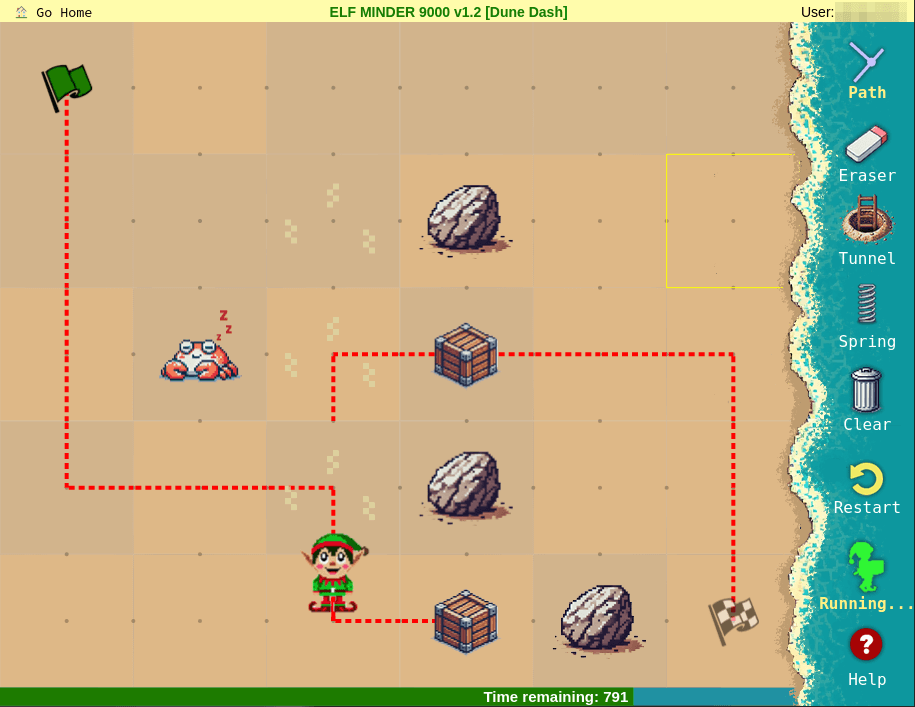
Then we click the path segment to the left, making the elf switch directions.

When the elf has gotten past the right path segment, we click it until we connect the upper path with the current path of the elf.

Coral Cove

Here we have to click the path segment of the next to last crate after the elf has passed by.

After the elf has passed through the upturn again, we have to press the path segment at the bottom to connect with the path to the finish flag.

Shell Seekers

After passing the next to last crate, we need to click the path segment just before the crate.

When the elf changes directions from the last clicked path segment, we click the path segment next to the finish flag to connect the path.

Palm Grove Shuffle
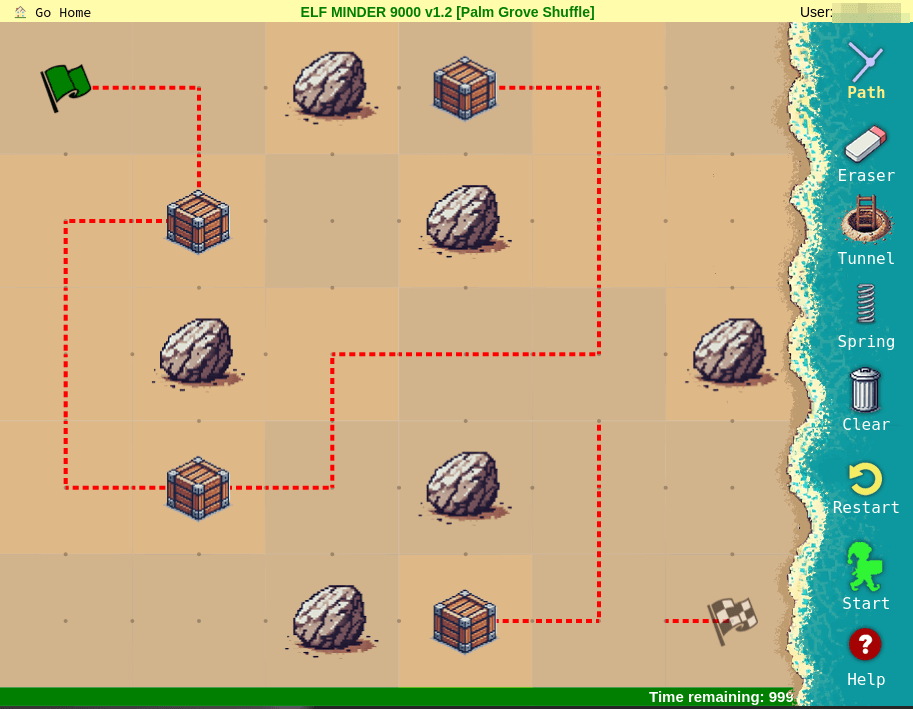
After passing the middle row first turn, we have to rotate that path segment.
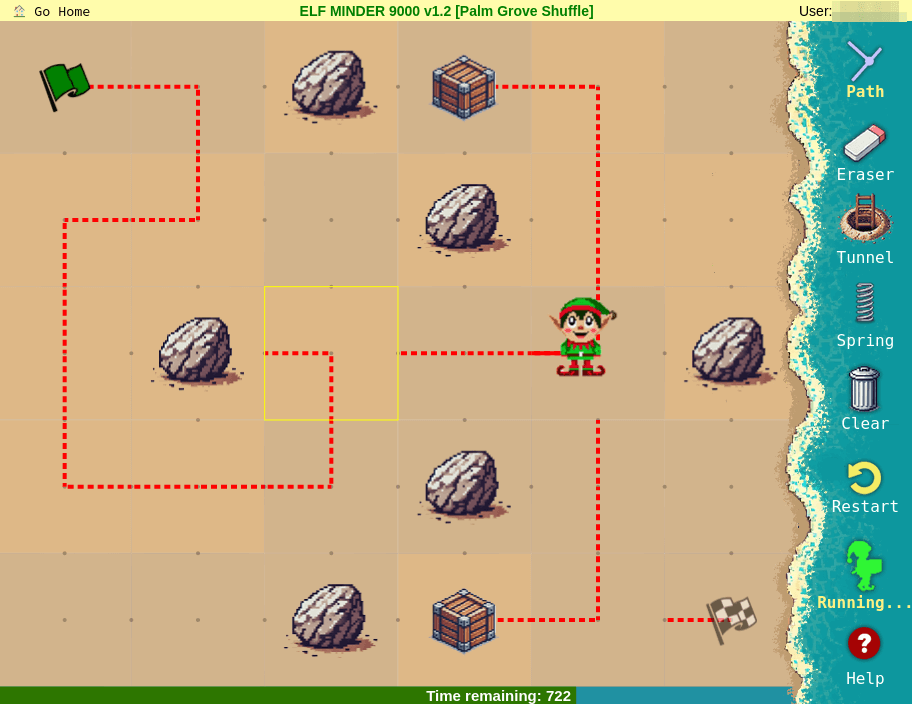
After collecting the next to last crate and switching directions, we have to wait until the elf enters the last path segment and click the rightmost segment on the middle row to connect the path to the last crate.

Now we have to connect the path to the exit after the elf has switched directions.

Tropical Tangle
This is the first level that we use anything other than clicks and path segments. At the exit, we use a tunnel from the last crate.
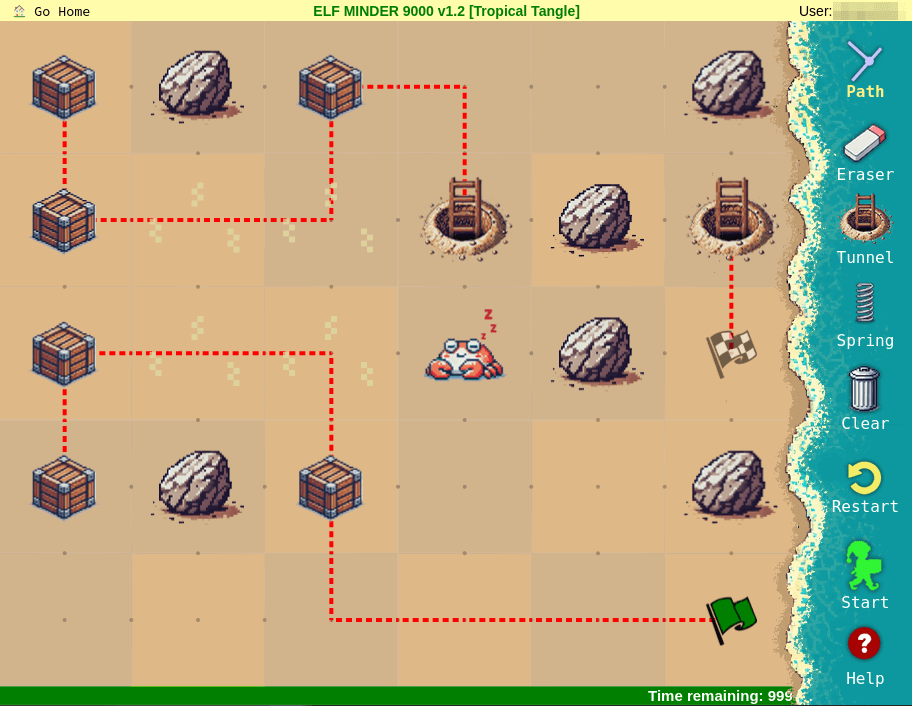
After passing the first crate, we connect the lower path to the upper left path.
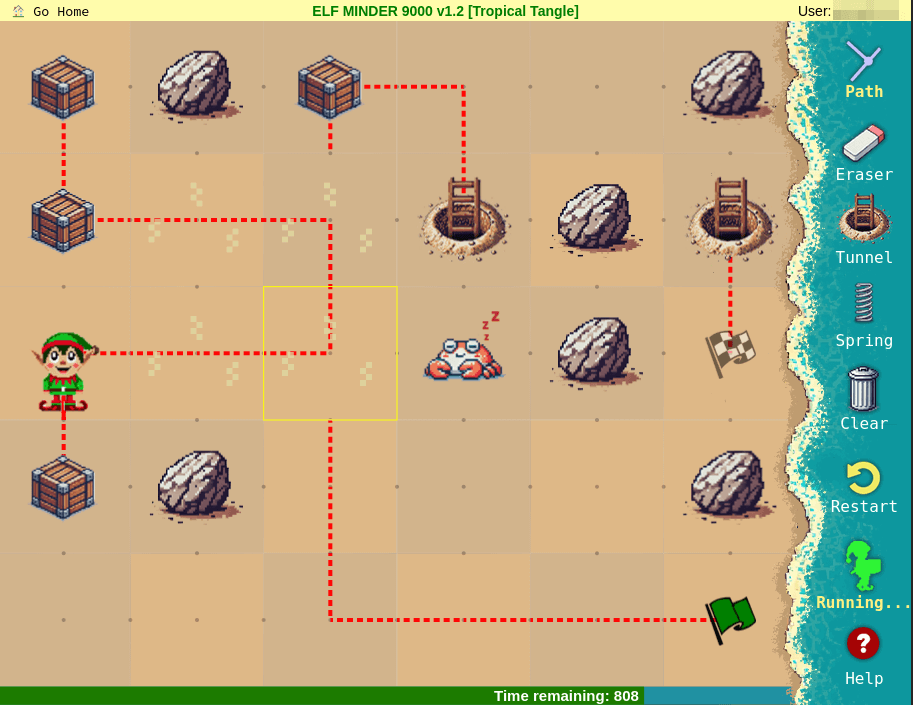
After collecting the two crates in the upper left path, we connect the path to the last stretch.

Crate Caper
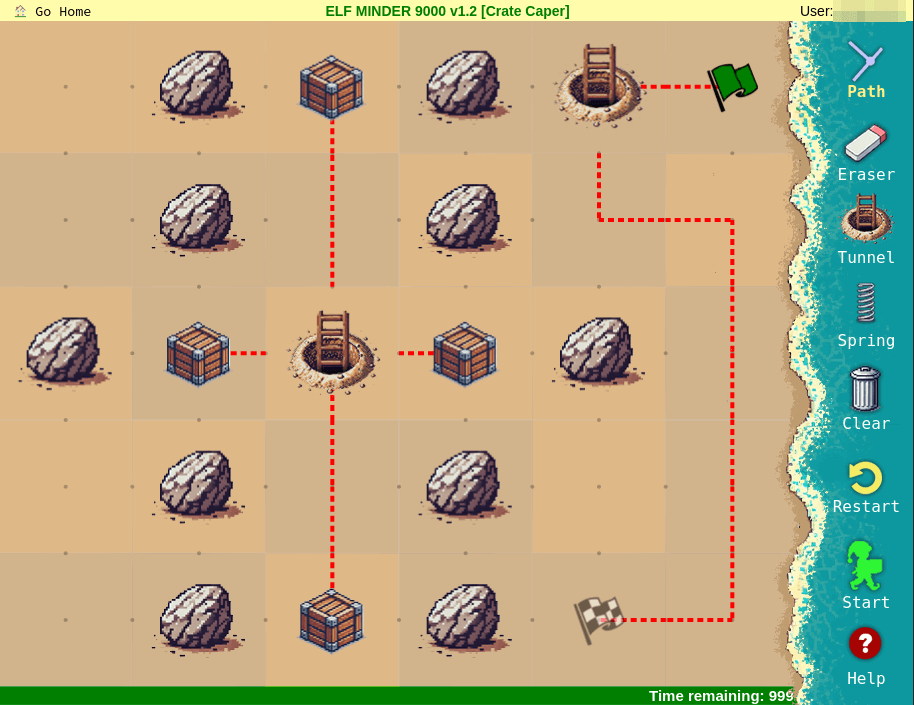
For this level, we have to let the elf switch directions a lot of times. After the elf picks up the first crate, we have to wait until the elf exits the tunnel by the start flag. When the elf is at the start flag, we switch the path of the tunnel in the middle.

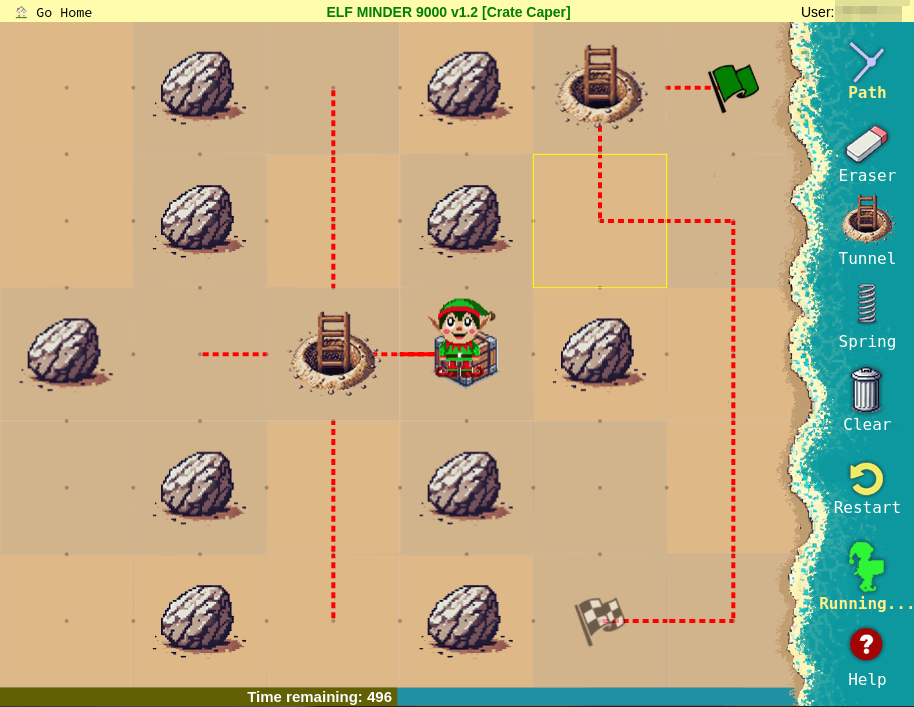
Then we repeat this process until all the crates are collected.
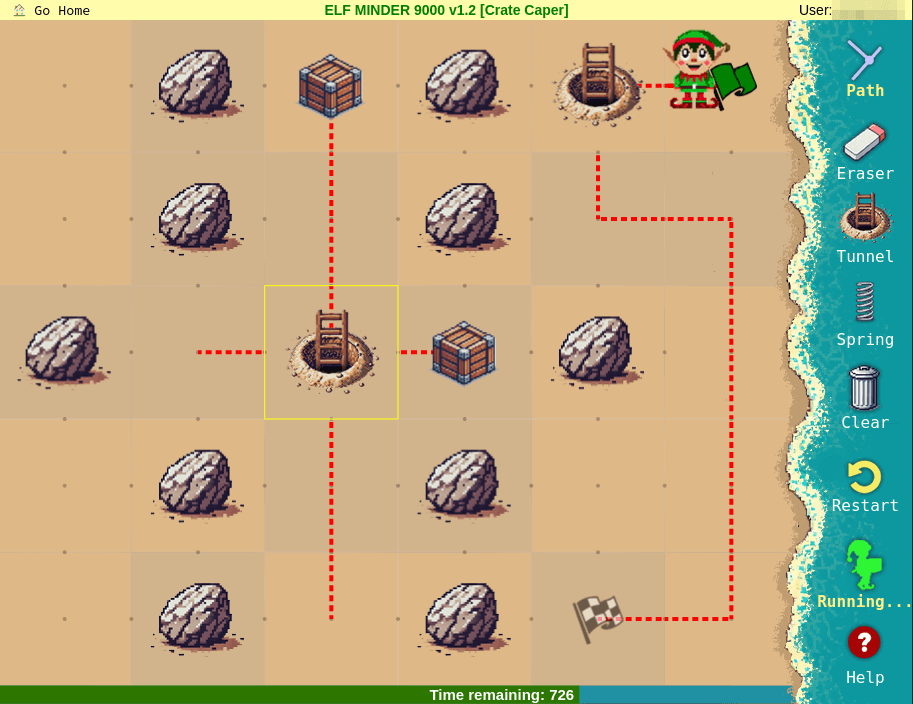

When the last crate is collected, we have to switch the path from the tunnel at the starting flag to connect to the exit path.
Shoreline Shuffle

In this level, we have to do a bit of clicking. After the elf has passed the first turn, we click that to connect to the leftmost crate path.
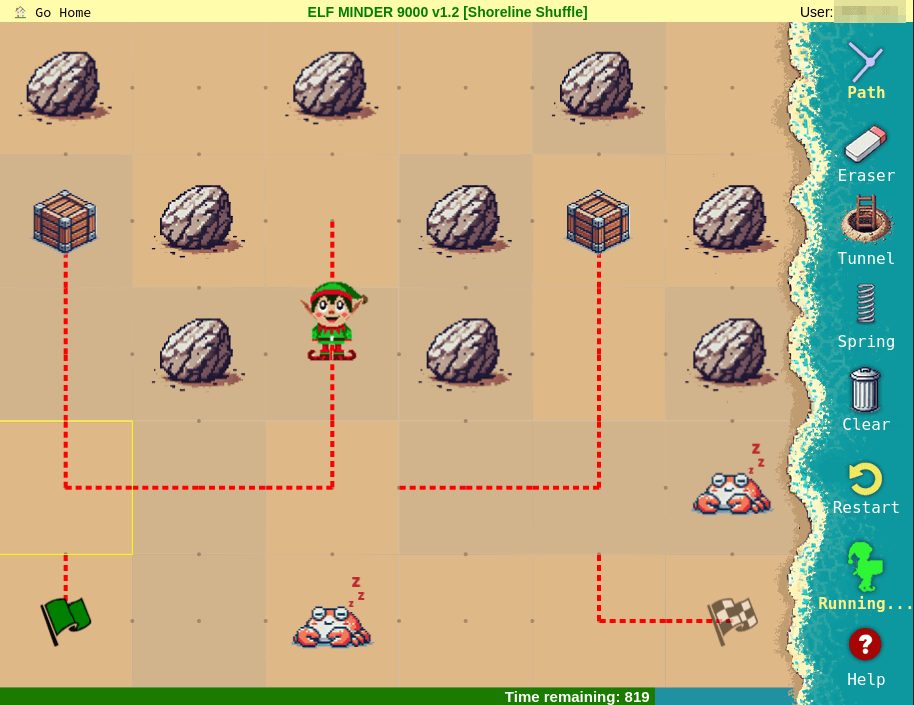
After collecting the second crate, we let the elf go all the way up to the middle path and click the lower path segment to connect to the last crate.

After collecting the final crate, we cut off the middle turn, to make sure we make it in time.

After the elf has passed the rightmost turn, we switch that to connect to the exit.

Beachy Bounty

After collecting the second crate, we click the path segment that contained the second crate.

Now we let the elf collect the last crate and turn back to the segment that contained the second crate. When the elf is at the bottom, we connect the path to the exit path.

Driftwood Dunes
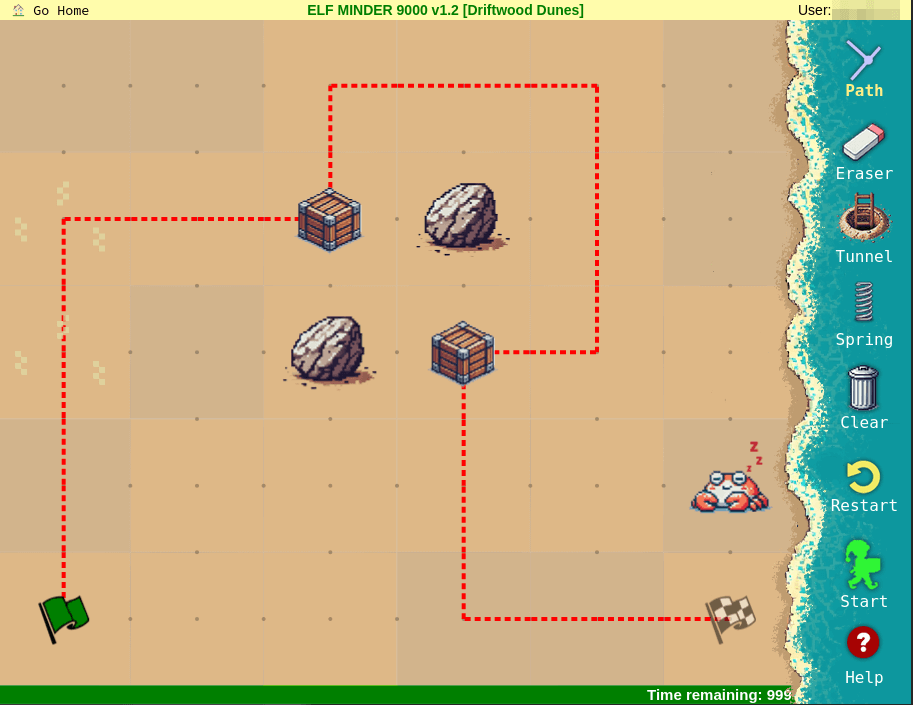
After completing this level, we complete the objective and get the silver trophy.

Talking to Poinsettia McMittens again, we get some new dialogue.
The rest of these elves are like corporate zombos. They just run around in circles unless you give them some direction.
Way to pass them some of your super centered energy. Better you than me, though. I’d let them walk themselves straight off the island.
You took the easy win, it seems we’re kindred spirits. But there’s also a hard way to solve this challenge.
The more segments you use, the higher the reward. But who actually wants life to be more difficult?
To get the gold trophy, we have to complete the final level.

This level looks a bit more difficult than the other ones, so we need to have a plan. But trying to place springs and tunnels where we want them doesn’t work. For example, we can’t place a spring at the first rock on the first row.

So we have to get creative. Let’s take a look at the code for the game. In the HTML file, four JavaScript files are referenced, chance.min.js, levels.js, guide.js, and game2.js.
The levels.js file contains all the configurations for the levels. For example the level configuration for Sandy Start.
   "Sandy Start": {
        "name": "Sandy Start",
        "entities": [
            [
                1,
                5,
                0
            ],
            [
                5,
                3,
                2
            ],
            [
                7,
                7,
                2
            ],
            [
                11,
                5,
                1
            ]
        ]
    },
The file game2.js contains the game logic and the file guide.js contains the Game class and some enums.
From guide.js we get the values used by different entities.
const EntityTypes = {
    START: 0,
    END: 1,
    CRATE: 2,
    BLOCKER: 3,
    HAZARD: 4,
    STEAM: 5,
    PORTAL: 6,
    SPRING: 7,
};
Here we also find out that the Game class contains a field containing the entities for the current level, called entities.
The Game class is declared at the top level in the game2.js file, let game;. So we should be able to access the variable using the Console tab in the browser DevTools.

Here we find the entities array.
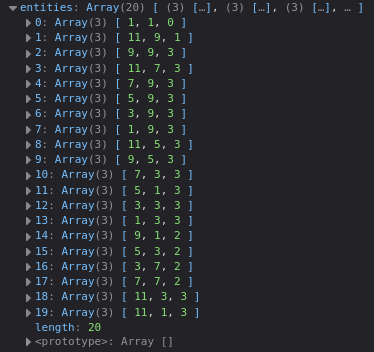
In the array are all the current entities on the level. As we can see, index 0 in the array contains EntityTypes.START at position x: 1, y: 1. Let’s see if we can add our own entities at the positions we want. We can find the first blocker on row one at index 11, with x: 5, y: 1. So we want to add a spring at x: 4, y: 1, with entity type 7.
To do this we can try to push the array [ 4, 1, 7 ] to the game.entities array. Entering game.entities.push([ 4, 1, 7 ]) in the Console tab and pressing enter adds a spring to the level.
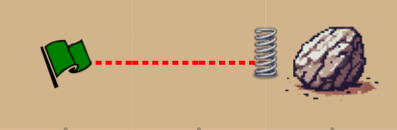
Now we can proceed with painting the path, adding springs and tunnels.
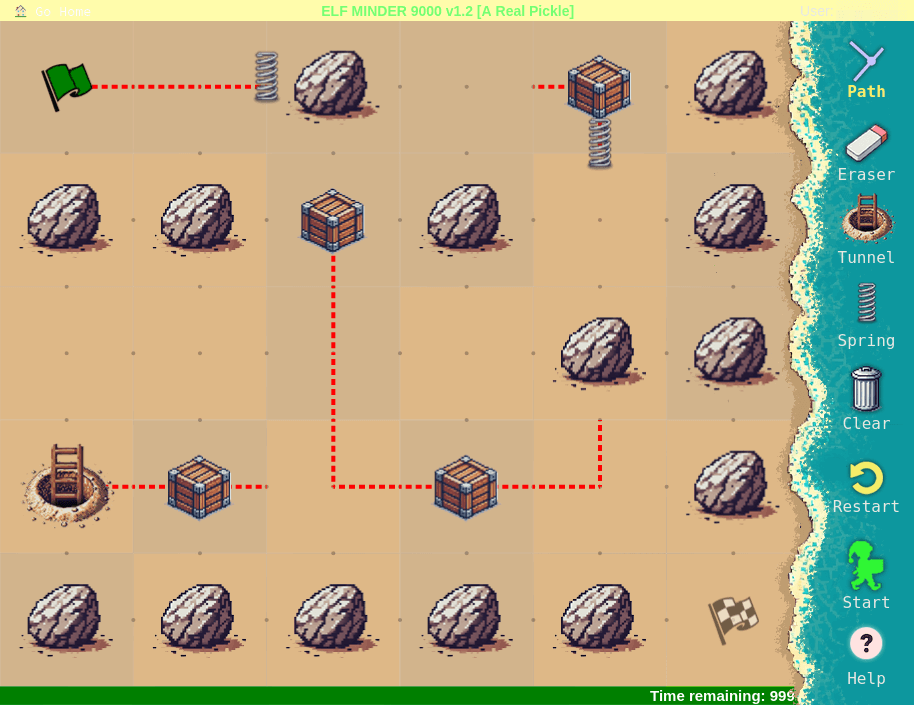
Now we have to add a tunnel to x: 11, y: 8. So we enter game.entities.push([ 11, 8, 6 ]) in the Console tab and press enter. This adds the tunnel, now all we need is to connect the tunnel to the exit.

We still need to use one click after the elf has picked up the third crate.

After finishing the level, we get the gold trophy.

 kza
kza 